
Telegram Signal Copier Settings & Parameters
Looking for connection instructions? Create your trading destination route, connect your Telegram account by verification code or QR code, and select a signal channel. The destination-specific connection steps are in the guides below, and both Telegram login methods are explained on this page.
Step 1 — Choose the connection guide
Connect your Telegram account: verification code or QR code
After creating a Telegram-source route, open Telegram Copier and click the route's gear icon to enter Telegram Copier Settings. Under Step 1. Connect Telegram, choose either method:
- Verification code: Enter your Telegram phone number with country code and click Send Code. This requests a code from Telegram but does not guarantee delivery. Check the official Telegram service chat on your signed-in devices; Telegram may offer SMS. Enter the code in Verification Code, supply the Telegram 2FA Password if requested, and click Connect Telegram.
- QR code (no login-code message required): Click Connect with QR Code. On a phone already signed in to the intended Telegram account, open Telegram > Settings > Devices > Link Desktop Device. Scan the QR displayed in AlgoWay and approve the login. The QR updates automatically when it expires. If your account has two-step verification enabled, complete the password prompt in AlgoWay.
If the requested code has not arrived after about one minute, use Connect with QR Code instead. To switch an account that is already connected, first click Disconnect Telegram; copying remains stopped until a Telegram account is reconnected and the copier is enabled.
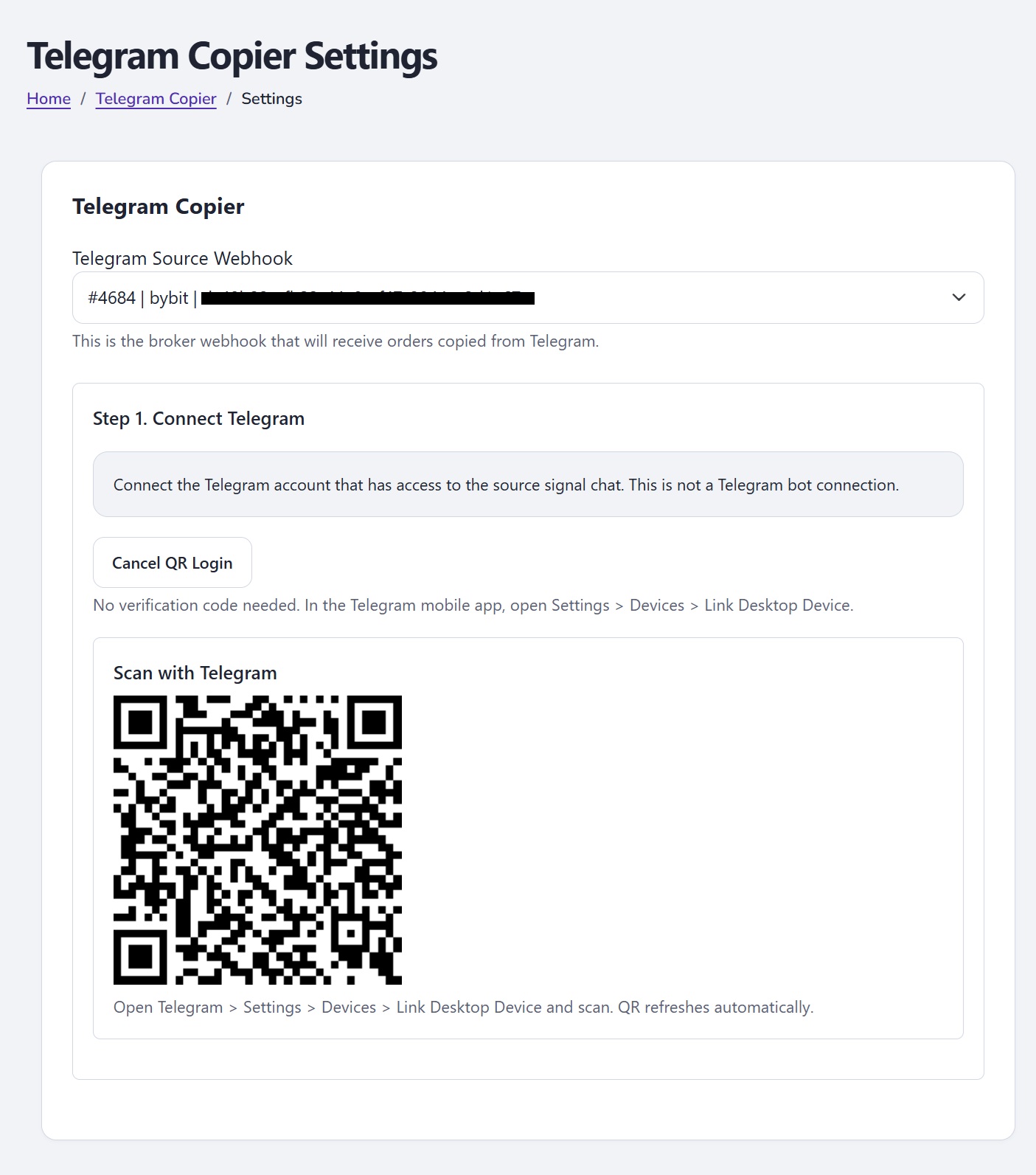
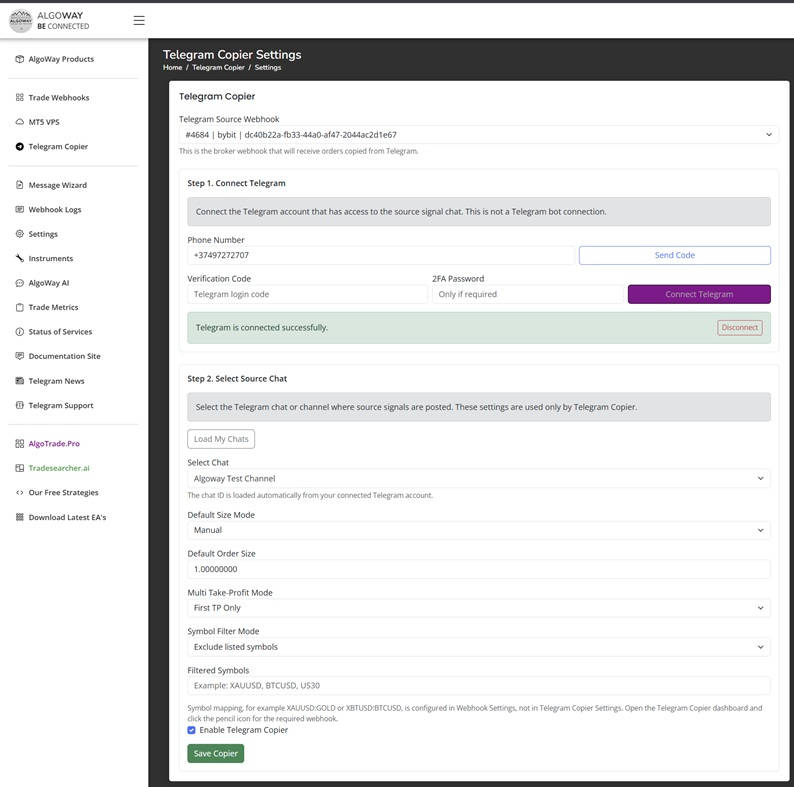
After authentication, go to Step 2. Select Source Chat, click Load My Chats, choose a channel or group the connected account can access, configure the copying rules, enable Telegram Copier, and click Save Copier. AlgoWay then returns to the Telegram Copier dashboard.
Examples: Connection settings vs. copier settings
Telegram → MT5: The MT5 connection guide explains installing AlgoWayWS-MT5 (or Universal Build), entering the route UUID and selecting a Telegram channel. After the connection works, use Default Size Mode here to choose how lots are determined and Multi Take-Profit Mode to control multiple targets.
Telegram → TradeLocker: The TradeLocker connection guide shows where to find the numeric Account ID and how to link the Telegram channel. If a signal uses XAUUSD while your broker calls it GOLD, consult Symbol Mapping; if messages have two target prices, consult First 2 TPs.
Telegram → cTrader: The cTrader connection guide explains OAuth O-API and FIX-P. For Telegram signals with Stop Loss and Take Profit, use cTrader O-API because the AlgoWay FIX-P route does not support those protections. Then configure the shared SL/TP Requirement and Entry Order Mode here.
Step 2 — Configure Telegram Copier parameters
This page is the single parameter reference for all destinations. It explains sizing, multiple targets, risk requirements, order-entry behavior, symbol filters, duplicate protection, breakeven and reply re-entry. You do not need a separate set of parameter instructions for each platform. When options change, this reference is updated in one place.
Where to find these parameters
On the Telegram Copier dashboard, use the route's gear icon for Telegram Copier Settings. The Telegram Source Webhook selector identifies which route is being configured. The pencil icon opens separate destination Webhook Settings, including credentials and symbol mapping. These are not the same settings page.
Changed settings must be saved with Save Copier. After a successful save, AlgoWay returns to the Telegram Copier dashboard. For account authentication via code or QR, see Connect your Telegram account.
Trial channels and updating an existing connection
One channel per copier: Each Telegram Copier route follows one source channel at a time. A 14-day trial provides a trial route for the chosen source and destination platform; trial access for that source and platform is available only once. Additional source channels require separate routes. To change the channel on your existing copier, open Configure Copier, choose the new source channel and click Save Copier.
Entered the wrong broker account? Do not delete the webhook or create another trial. In Telegram Copier, click the pencil icon (Edit Webhook) beside the existing route, correct its destination details and click Save Changes. For example, if the TradeLocker Account ID is wrong, you can correct that field in place. The existing UUID and remaining trial period are preserved. The same editing method applies to ordinary routes on the Trade Webhooks dashboard.
Two separate settings pages: the gear icon edits Telegram source and signal-handling options; the pencil icon edits the connected destination broker account and webhook properties.
Default Size Mode
The Default Size Mode determines how AlgoWay obtains the order size for a Telegram signal. Auto, Manual, Per Symbol, and Money Per Symbol may use a valid size detected directly in the signal. Crypto Fixed Money always uses the configured money amount. For MetaTrader 5 only, the additional Money Fixed and Money Risk modes also override any lot quantity in the source message and let the MT5 EA calculate the broker-valid volume.
Auto
In Auto mode, AlgoWay uses the order size detected in the Telegram signal.
BUY XAUUSD
Lot: 0.10
SL: 2330
TP: 2360
If the message does not contain a usable size, Auto mode has no configured fallback size. The trading command cannot be sent until a valid order size is available.
Manual
In Manual mode, a size explicitly detected in the Telegram signal still has priority. If the signal does not provide a usable size, AlgoWay uses the value entered in Default Order Size. Manual is a fallback, not a fixed-lot override. For example, if your default is 0.10 lots but the provider posts Lot: 0.30, the copier uses 0.30 lots. If no lot size is provided, the copier uses 0.10 lots.
Default Order Size: 1This mode is useful when the provider sometimes publishes position size and sometimes sends only the symbol, direction, Stop Loss, and Take Profit.
Fixed Money — Margin or Position Value
Fixed Money is available for supported cryptocurrency exchange destinations. It uses the same configured monetary amount for each new Telegram signal, regardless of the symbol, and ignores any quantity or position size in the Telegram message. When Default Size Mode is set to Fixed Money, an additional selector, Fixed Money Type, appears with two values:
| Fixed Money Type | What the entered amount means | Example: 200 USDT at 20x leverage |
|---|---|---|
Margin (USDT) margin | Margin budget for the signal. On leveraged futures, AlgoWay multiplies the amount by the effective leverage to calculate the target total position value. This is the default and preserves the previous Fixed Money behavior. | 200 USDT margin; target position value 4,000 USDT. |
Position Value (USDT) position_value | Target total notional position value including leverage. AlgoWay does not multiply this amount by leverage when calculating order quantity. | Target position value 200 USDT; estimated margin 10 USDT. |
Default Size Mode: Fixed Money
Fixed Money Amount: 200
Fixed Money Type: Position Value (USDT)
Destination leverage: 20x
Target total position value: 200 USDT
Estimated margin: 10 USDT
Leverage priority on futures: when a positive leverage is configured in the destination webhook settings, it takes precedence over the leverage written in a Telegram signal. If no destination leverage is configured, AlgoWay uses the signal leverage when available. For example, a Telegram message requesting 50x does not override a configured 20x while using Fixed Money. With Margin = 200 and 20x, the target position value is 4,000 USDT; with Position Value = 200, it remains 200 USDT.
Multiple Take Profits: the amount is calculated for the initial signal before TP splitting. Split Size Between TPs distributes that total across the detected TP orders; Full Size For Each TP can repeat the full configured amount for every TP and therefore increase total exposure. Choose First TP Only if you want a single entry order targeting TP1.
Order quantity and pricing: AlgoWay converts the monetary amount to a tradable quantity using an entry price and the exchange instrument rules. For a market order without a usable signal entry price, it attempts to retrieve the current market price; if the required price or market data cannot be obtained, sizing fails. Quantity precision, exchange minimums, execution price and fees may affect the final exposure and margin. Position Value is a sizing target, not a guaranteed hard maximum on filled notional value.
Spot markets: no leveraged margin calculation is applied; both types use the entered amount as the target order value. This new selector is specific to cryptocurrency fixed_money, not the separate MT5 money_fixed or money_risk modes.
Per Symbol
In Per Symbol mode, a size explicitly detected in the Telegram signal also has priority. If the signal does not provide a usable size, AlgoWay looks for the signal symbol in Default Size By Symbol.
BTCUSD:0.2, XAUUSD:2, EURUSD:0.4, ETHUSDT.P:2The format is:
SYMBOL:size, SYMBOL:sizeIf the signal contains no usable size and its symbol is not present in this list, no default size can be assigned and the trading command cannot be sent.
Default Size By Symbol is not symbol mapping. The value after the colon is an order size, not another symbol name.
Money Per Symbol
Money Per Symbol is available for supported cryptocurrency exchange destinations. Instead of entering the final number of contracts or coins, enter the monetary amount that AlgoWay may use for each configured symbol.
BTCUSDT:100, ETHUSDT:50, SOLUSDT:25The format is:
SYMBOL:money, SYMBOL:moneyFor example, BTCUSDT:100 tells AlgoWay to calculate the valid BTCUSDT order size from 100 units of the account currency. AlgoWay uses the Entry Price from the Telegram signal together with the destination exchange instrument rules to calculate and normalize the final order quantity.
A size explicitly written in the Telegram signal still has priority. When the signal does not provide a size, Money Per Symbol requires both a configured money amount for the detected symbol and a valid Entry Price in the message. A market signal without an Entry Price cannot use this mode because the order quantity cannot be calculated before the command is sent.
Money Fixed and Money Risk — MT5 only *
These are two additional options available in Telegram Copier Settings when the destination is MetaTrader 5. Unlike the cryptocurrency Fixed Money option above, Money Fixed and Money Risk send the configured USD amount to the MT5 Expert Advisor. The EA uses live broker quotes and symbol specifications to calculate lots. A price in the Telegram message is not required for market orders.
| Size mode | What the amount means | What is required |
|---|---|---|
Money Fixed (USD margin) money_fixed | Example: 100 requests a position requiring no more than approximately $100 of margin, not a $100 notional position or 100 lots. | Positive USD amount; adequate free margin and a broker-supported minimum lot. |
Money Risk (USD at Stop Loss) money_risk | Example: 100 sizes the entry for approximately $100 potential loss at SL. | Positive USD amount and a usable Stop Loss from the Telegram signal, custom copier SL, or EA internal SL. No valid SL means the entry is rejected. |
Telegram Copier Settings
Default Size Mode: Money Risk (USD at Stop Loss)
Maximum risk per trade (USD): 100
The two MT5 modes override lot sizes explicitly written in Telegram messages. The MT5 EA handles conversion from USD when the trading account uses another currency. Actual margin and realized loss may differ due to execution prices, slippage, gaps, commissions and broker requirements. An amount below the broker's minimum tradable lot is rejected rather than rounded up beyond the intended budget.
money_risk = 100, the combined intended risk can approach $300, not $100. In split modes the budget is divided between orders; broker lot minimums and rounding still apply. For an initial money-sizing test, choose First TP Only.* Availability: money_fixed and money_risk are supported for MetaTrader 5 destinations using an updated compatible AlgoWay EA, not cryptocurrency exchanges, Tradovate, TradeLocker or other non-MT5 destinations. See Telegram to MT5 connection, MT5 sizing details and the JSON field reference. These options are distinct from the cryptocurrency fixed_money mode.
Symbol Mapping (Destination Webhook Settings)
Symbol mapping is configured in Webhook Settings, not in Telegram Copier Settings.
Return to the Telegram Copier dashboard and click the pencil icon for the required route.
Use symbol mapping when the Telegram provider and destination platform use different names for the same instrument.
XAUUSD:GOLD
XBTUSD:BTCUSD
The format is:
SOURCE_SYMBOL:DESTINATION_SYMBOLFor example, if the Telegram message contains XAUUSD but the broker expects GOLD, configure XAUUSD:GOLD.
Multi Take-Profit Mode
The Multi Take-Profit Mode controls how AlgoWay handles a new buy or sell signal containing several Take Profit levels.
- First TP Only: AlgoWay uses only the first detected Take Profit level.
- First 2 TPs: AlgoWay uses only TP1 and TP2 and divides the original total size equally between those two orders. If the signal contains only one Take Profit level, it is processed as one ordinary order.
- Split Size Between TPs: AlgoWay divides the total order size between all detected Take Profit levels and creates one order for each level. An optional TP1 Size (%) setting can reserve a larger or smaller share of the total position for TP1, while the remaining size is distributed automatically between the remaining Take Profit levels.
- Full Size For Each TP: AlgoWay creates one full-size order for every detected Take Profit level.
Example:
BUY XAUUSD
Lot: 0.30
TP1: 2350
TP2: 2360
TP3: 2370
With First 2 TPs, AlgoWay ignores TP3 and creates two orders of 0.15 each. With Split Size Between TPs, the total size is split across all three Take Profit orders. With Full Size For Each TP, each Take Profit receives the full configured size of 0.30.
TP1 Size (%) for Split Size Between TPs
When Split Size Between TPs is selected, the optional TP1 Size (%) field controls how much of the total position is assigned to the first Take Profit. AlgoWay then distributes the remaining position size automatically between the remaining detected Take Profit levels.
For example:
Default Order Size: 6
TP1 Size: 50%
Detected Take Profits: 4
The resulting split is:
TP1: 3
TP2: 1
TP3: 1
TP4: 1
The number of Take Profit levels does not need to be fixed in advance. AlgoWay applies the TP1 share to the current signal and distributes the remaining size across the other available targets. When the signal contains only one Take Profit level, TP1 Size (%) is ignored and the full order size is assigned to that single TP.
Leaving TP1 Size (%) empty keeps the standard equal Split Size behavior. Final quantities remain subject to the destination platform's supported quantity precision and contract rules.
Stop Loss Source and Take Profit Source
Stop Loss Source and Take Profit Source are two independent settings in Telegram Copier Settings. Choose where your Stop Loss comes from and, separately, where your Take Profit levels come from. You can keep the provider's Stop Loss while using your own Take Profits, or override only the provider's Stop Loss while keeping its TP levels. These settings apply to new BUY/SELL entries; changing the settings does not automatically modify positions or pending orders already sent to the broker.
Stop Loss Source
- Telegram Signal: Use the Stop Loss detected in the source channel's message. No custom SL field is needed.
- Custom Pips: Ignore the channel's SL and use the distance entered in the Stop Loss (Pips) field. The destination platform determines the applicable pip/tick units.
- Custom Percent: Ignore the channel's SL and use the value in Stop Loss (%) as a percentage price distance from the execution/reference price.
Take Profit Source
- Telegram Signal: Use the Take Profit targets detected in the source channel's message. The Multi Take-Profit Mode decides how many targets to execute and how to distribute order size.
- Custom Pips: Ignore the channel's Take Profit levels and use your own TP1 / TP2 / TP3 distances in pips/ticks.
- Custom Percent: Ignore the channel's Take Profit levels and use your own TP1 / TP2 / TP3 percentage price distances.
How to configure: Go to Telegram Copier, click the relevant route's gear icon, select Stop Loss Source and Take Profit Source independently, enter any visible custom values, choose the required Multi Take-Profit Mode, and click Save Copier. When a source is Telegram Signal, its custom input fields are hidden. For custom SL, a positive Stop Loss is required. For custom TP, enter at least one positive TP value; leave other TP fields empty or set them to 0 to disable those levels.
Example: custom Stop Loss with Telegram TP1 and TP2
Suppose your signal provider sends:
Coin: ASTERUSDT Long
Leverage: x10
Entry: 0.6778
Target 1: 0.7324
Target 2: 0.7957
SL: 0.6647
Set Stop Loss Source = Custom Percent, enter Stop Loss (%) = 35, and set Take Profit Source = Telegram Signal. AlgoWay replaces the provider's SL at 0.6647 with your 35% price-distance stop but keeps the channel's absolute TP prices of 0.7324 and 0.7957. For a Buy LIMIT at 0.6778, 35% below the entry price is approximately 0.4406 before the broker's price-step rounding. Actual orders remain subject to the destination's validations.
Important: TP selection is separate. If Multi Take-Profit Mode = First TP Only, only TP1 is used even when the channel publishes TP2. Choose First 2 TPs to use both targets with a split of the original size, or Split Size Between TPs to distribute the total size among the detected targets. If the channel supplies only one valid TP, the copier uses a single target. Full Size For Each TP creates separate full-size orders and may increase the total exposure.
Unit compatibility: The trading JSON uses one sltp_type for relative SL/TP distances. Therefore Custom Pips for SL with Custom Percent for TP (or vice versa) cannot be saved together. Absolute SL/TP prices from Telegram can be combined with a custom percent or pip distance on the other side. If Telegram provides a relative SL or TP in units incompatible with the selected custom side, the signal is rejected rather than changing its units silently. These rules do not alter the Telegram signal's entry price or your position-size settings.
SL/TP Requirement
The SL/TP Requirement controls whether a new BUY or SELL signal may be executed when protective levels are missing from the original Telegram signal.
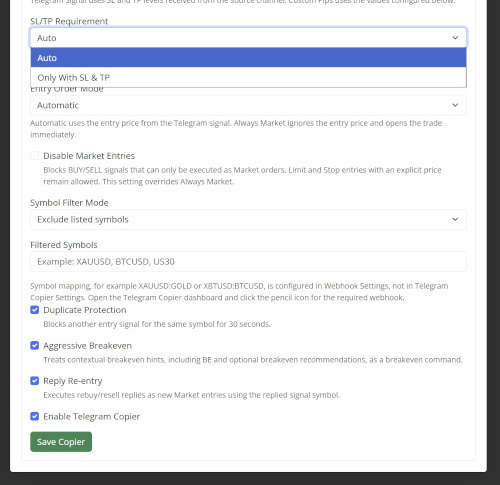
- Auto: keeps the normal AlgoWay behavior. A valid entry signal may be processed whether or not the source message contains both Stop Loss and Take Profit.
- Only With SL & TP: allows a new BUY or SELL entry only when AlgoWay detects both a Stop Loss and at least one Take Profit in the Telegram signal. If either one is missing, the entry is ignored.
This requirement applies only to new BUY and SELL entries. Position-management actions such as flat, modify, and breakeven are not rejected by this rule.
Only With SL & TP checks the original Telegram message before custom SL and TP settings are applied. This also applies when Stop Loss Source or Take Profit Source is set to Custom Pips or Custom Percent: with this requirement enabled, the original channel message must include both an SL and at least one TP. If you want a custom SL to protect an entry whose Telegram message includes TP but no provider SL, select Auto for SL/TP Requirement. Auto does not create a missing Telegram TP when Take Profit Source is set to Telegram Signal.
Entry Order Mode and Market Entries
The Entry Order Mode controls how AlgoWay handles entry prices detected in new Telegram BUY and SELL signals.
- Automatic: AlgoWay interprets the signal's entry instructions, including an entry range when present. It normalizes a range into one entry price rather than creating a series of orders throughout the range. A valid price may result in a Limit or Stop order, while a signal such as BUY NOW may result in a Market order, subject to the other copier rules and the destination platform.
- Always Market: AlgoWay ignores the detected entry price for execution and sends every valid new BUY or SELL signal as a Market order.
- Skip Entry Ranges: AlgoWay completely ignores BUY or SELL signals containing an entry price range. Signals containing one entry price, as well as valid signals without an entry price such as BUY NOW, remain allowed and are executed as Market orders.
For example, in Automatic mode, a signal such as BUY XAUUSD Entry: 2340-2345 can be interpreted into one entry price; the broker does not receive a range of prices. The chosen price and order type depend on the interpreted signal, not a promise of execution at every price in that interval.
For example, with Skip Entry Ranges enabled:
BUY EPIC
Entry: 0.46-0.43
SL: 0.40
TP: 0.52
is ignored completely and no order is created.
BUY EPIC
Entry: 0.46
SL: 0.40
TP: 0.52
is accepted and executed as a Market order.
BUY EPIC NOW
SL: 0.40
TP: 0.52
is also accepted and executed as a Market order.
Disable Market Entries adds a separate safety rule. When enabled, new BUY and SELL signals that can only be executed as Market orders are blocked. Limit and Stop entries with an explicit valid entry price remain allowed.
Disable Market Entries has priority over the Entry Order Mode. When it is enabled, AlgoWay does not force a valid pending entry into Market execution even when Always Market or Skip Entry Ranges is selected. Signals that require Market execution and have no valid pending entry are blocked.
For example:
gold sell now 28is a valid market SELL instruction and is normally executable. With Disable Market Entries enabled, it is blocked.
XAUUSD SELL NOW AT 4428 - 4433
Stop Loss: 4438
Take Profit 1: 4423
Take Profit 2: 4418
contains an explicit entry range. In Automatic mode, AlgoWay may normalize such a range into a pending entry, so it can remain eligible when Market entries are disabled. In Skip Entry Ranges mode, the same signal is ignored completely and no order is created.
Money Per Symbol still requires a valid Entry Price in the Telegram signal to calculate the order size. Always Market changes how the final order is executed, but it does not remove the price required for that calculation.
Symbol Filter
The symbol filter determines which instruments may be copied from the selected Telegram channel.
- Exclude listed symbols: signals for the listed symbols are ignored; other symbols are allowed.
- Allow only listed symbols: only signals for the listed symbols are allowed; other symbols are ignored.
Enter several symbols separated by commas:
XAUUSD, BTCUSD, US30An empty symbol list does not restrict copying.
The symbol filter is separate from symbol mapping. The filter decides whether a symbol may be processed. Symbol mapping changes the symbol name sent to the destination platform.
Duplicate Protection, Breakeven and Reply Re-entry
Duplicate Protection
Duplicate Protection blocks another new BUY or SELL entry for the same symbol during the configured protection period. Set Duplicate Protection Duration (seconds) in Telegram Copier Settings. The default is 30 seconds; the current field accepts 1 to 86,400 seconds.
This is a short duplicate/noise protection window. It is not an open-position manager and does not mean that only one position may exist for a symbol. A new valid entry received after the configured protection window may open another position.
Duplicate Protection does not block position-management actions such as breakeven, modify, or flat.
Seeing several orders from one signal? Use the duplicate-trade troubleshooting guide to distinguish multi-target sizing from repeated entries and choose a protection duration.
Aggressive Breakeven
When Aggressive Breakeven is disabled, AlgoWay acts on clear and explicit breakeven commands. When it is enabled, contextual breakeven recommendations and hints can also be treated as executable breakeven instructions.
For example, a message such as:
You may set a breakeven stop loss now.is treated more aggressively when this option is enabled. The setting is intended for signal providers that frequently publish breakeven instructions in conversational language instead of strict commands.
Forced after TP1 — Telegram Copier
Enable Forced after TP1 to have the Telegram Listener send a breakeven management command when the source channel publishes a recognizable TP1 hit message for a matching, previously tracked multi-TP trade. The listener must be able to associate that message with an armed trade; unrelated TP1 announcements are ignored. It is not triggered solely because a broker price touches TP1.
The command attempts to move the remaining position's Stop Loss toward its entry price, not to the TP1 price. Broker stop-level restrictions and execution state still apply. This setting is separate from Aggressive Breakeven (interpreting conversational BE instructions) and from the EA's BreakevenAfterTP1 input, which watches an actual EA-managed TP1 partial close. See MT5 breakeven after TP1.
Reply Re-entry
Reply Re-entry supports Telegram messages containing the words rebuy or resell when they are sent as an actual Telegram reply to an earlier signal.
AlgoWay reads the replied message, identifies its symbol and original direction, and creates a new market entry in the same direction. A standalone rebuy or resell message that is not a Telegram reply is ignored.
Reply Re-entry does not copy the old entry price, Stop Loss, or Take Profit from the replied signal. It creates a new market entry using the current copier size rules.
Important: Reply Re-entry is a market-entry feature. If Disable Market Entries is enabled, rebuy/resell re-entry is blocked. If SL/TP Requirement is set to Only With SL & TP, reply re-entry is also blocked because the synthetic re-entry does not inherit SL/TP from the original signal.
How the parameters work together
AlgoWay parses the Telegram message before applying the copier rules. The normalized trading command is then passed to the connected platform, where order types, volume limits and protective-order support depend on the destination. A parsed signal does not guarantee a broker will execute it.
For route setup, see Telegram to MT5, Telegram to TradeLocker or Telegram to cTrader.
Last updated: October 25, 2026